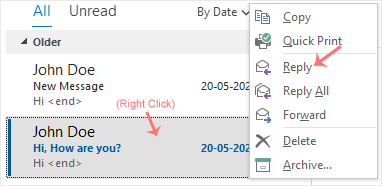
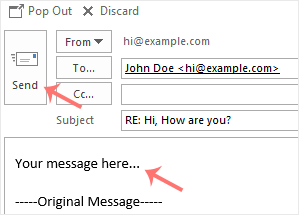
You can reply to emails using Outlook 2019 instead of cPanel Webmail.
1. Open Outlook 2019.
2. Right-click the email you want to reply to and select Reply.
3. On the right side, the response box will open. Enter your message and click Send.
To create a new email address, perform the following steps: 1. Log in to your cPanel account....
If you are on holiday or you will be unavailable for a few days or a month, you can create an...
You can access your Email account directly from Webmail.1. Open http://example.com/webmail,...
How to forward an email? 1. Log in to your cPanel account. 2. In the Email section, click on...
You can change your email account's password through the following steps: 1. Log in to your...
版權所有 © 2026 Tservers4 Web Hosting。版權所有。